SaaS Collections Software for B2B SaaS Companies and Annual Contracts
Your billing system retries cards. DebtAgent chases the invoices that never had a card on file: annual renewals, net 30 and net 60 contracts, and the PO that stalled in accounts payable.
Flat fee from $49 a month. No contingency, no percentage of what you collect. You stay the creditor of record.
SaaS collections software chases overdue invoices on B2B subscription contracts: annual and quarterly renewals billed on net 30 or net 60, where the customer pays by ACH or check after its own approval process. Billing system dunning in Stripe Billing, Chargebee or Maxio is built around a card on file, so it retries a card that does not exist and resends the same template. DebtAgent loads your open invoices from a CSV export, or on Pro reads them from QuickBooks Online or Xero each morning, drafts an escalating sequence in your company's name, and stops the moment the invoice is paid. Plans cost $49, $149, $499 or $898 a month, published and month to month.
What SaaS finance teams need from collections software
A self-serve product loses late revenue to declined cards. A sales-led product loses it to invoices sitting in someone else's AP queue. These are the six things that fix the second problem.
Reads the aging report for you
On Pro, connect QuickBooks Online or Xero once and every morning DebtAgent pulls open invoices, updates balances and days past due, and starts a cadence on anything that crosses the threshold you set. On Starter and Plus, upload the aging report as a CSV in a minute. Your ledger stays the source of truth; nothing is written back to it.
Stops itself when Stripe says paid
Point a webhook from your own Stripe account, or any system that can sign a request, at DebtAgent. When the customer pays, the payment lands, the invoice closes and the next reminder never goes out. No awkward chaser to a customer who paid yesterday.
Escalates instead of repeating
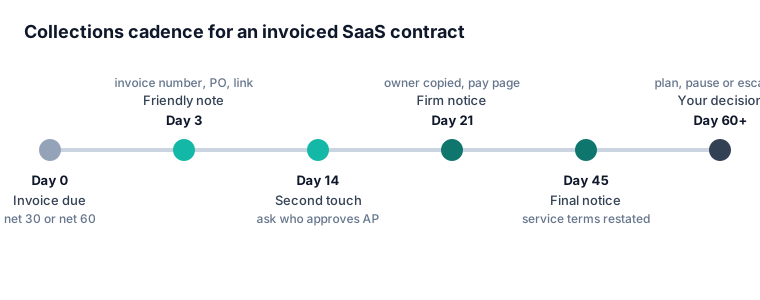
Friendly at day 3, a second touch at day 14 asking who approves payables, firm at day 21 with the account owner copied, final at day 45. Each message names the invoice, the amount, the PO and the signed order form, so it reads like it came from your finance lead.
You approve before anything sends
The agent drafts the whole sequence for each account and you read it first. Edit the tone for a strategic logo, skip a step for a customer in a renewal negotiation, or let the standard cadence run for the long tail.
A payment page per customer
Every debtor gets a private page with the balance, the invoice documents and the option to promise a date or ask for an installment plan. Promises pause the cadence; broken promises resume it. Your customer success team sees the same history.
Priced by accounts, not by ARR
Starter covers 50 active debtors, Plus 250, Pro unlimited. The price does not climb when your billings grow, and there is no percentage of recoveries. Yearly billing costs half: $294, $894, $2,994 or $5,388.
How SaaS collections runs in DebtAgent
Most finance teams have the first ten accounts in a live cadence the afternoon they sign up.
-
Step 1
Connect your ledger
Upload a CSV of open invoices from your billing system, or on Pro link QuickBooks Online or Xero. Each customer appears with invoice numbers, amounts, due dates and days overdue.
-
Step 2
Set your threshold
Choose when collections begins, for example 5 days past due on net 30 and 10 days on net 60. Exclude accounts your CSM is already working, or flag strategic logos for manual approval.
-
Step 3
Approve the drafts
Read the sequence for each account. Messages go from your company name and replies land in your own inbox, so a customer who answers reaches a person on your team.
-
Step 4
Let payments close the loop
Connect the payment webhook from Stripe or your bank feed. Paid invoices close themselves, promised dates pause the cadence, and the timestamped log shows every touch for your audit file.
SaaS billing system dunning vs collections software
Stripe Billing, Chargebee and Maxio do excellent work on failed card payments. This table is about the invoiced side of the business, where they were not designed to lead. Competitor details were read on each vendor's own pages in October 2026.
| What the job needs | Billing system dunning | DebtAgent |
|---|---|---|
| Failed card renewal | Smart retries and an update-card email. The right tool for this | Not the job. Keep your billing system's retries on |
| Invoice paid by ACH or check on net 30 or net 60 | Templated reminder emails, the same wording each time | Escalating sequence that names the invoice, PO and order form |
| Who the message comes from | Your billing system's notification address | Your company name, replies to your inbox |
| Copies the account owner on a firm notice | No | Yes, from the firm step onward |
| Payment promise and installment requests | No | Customer payment page with promise and plan options |
| Stops when paid | Yes, for payments made in that billing system | Yes, through a signed payment webhook on every plan, or QuickBooks and Xero sync on Pro |
| Review before sending | No, templates fire automatically | Every sequence drafted for your approval |
| Compliance log of every touch | Billing event history | Timestamped log of each decision and message |
| Price | Stripe Billing 0.7% of billing volume; Chargebee Receivables and Maxio A/R by quote | $49, $149, $499 or $898 a month flat |
Use both. Let the billing system handle declined cards, and let collections software handle invoices that need a person, or something acting like one, to follow up.
Why SaaS collections is different from consumer debt collection
A SaaS company chasing an overdue invoice is collecting its own receivable from another business, often one it wants to keep as a customer for years. That changes nearly everything about the work. The goal is a paid invoice and a renewed contract, not a recovery at any cost, and the person who reads your reminder is usually an AP clerk or a controller who did not sign the deal.
So the useful messages are specific. They name the invoice number, the amount, the PO number if one was issued, the date the order form was signed, and the name of the champion on the customer side. They ask a concrete question, such as who approves payables now that the original buyer has left. And they escalate in tone on a schedule, because the fourth identical reminder is ignored just like the first.
First-party collection on business debt sits outside the federal FDCPA, which covers consumer debts collected by third parties. DebtAgent still applies contact windows, frequency limits and a timestamped log on every touch, because those are good practice and because your auditors will ask.
Best collections software for B2B software companies selling annual contracts
For a B2B software company selling annual contracts on invoice, the best collections software is one that reads open invoices from your ledger, escalates on its own schedule and stops the instant a payment lands. A $36,000 annual invoice that is 40 days late is one account, not one thousand, and it deserves a follow up that reads like it came from your finance lead.
Annual billing concentrates risk. One unpaid renewal can be a meaningful share of a quarter's cash, and it usually stalls for a boring reason: the invoice went to an old AP address, a new PO is required, or the customer's procurement team wants a W-9 again. A good cadence surfaces those reasons early. The day 14 message in DebtAgent asks exactly that, so the answer arrives while the account is still in the 1 to 30 day bucket, where recovery is highest.
If you bill monthly by card and most of your late revenue is declined payments, start with failed payment recovery in your billing system instead. If you invoice, read on. We compare the tools SaaS teams shortlist, with every published price, in best collections software for SaaS companies.
How do B2B SaaS companies automate collections without adding AR headcount?
B2B SaaS companies automate collections without new AR hires by letting software draft and send the routine follow ups, and keeping a person only for the replies and the exceptions. In practice one controller can supervise a few hundred open invoices when the first three touches on every account run on a schedule.
The math is simple. A bookkeeping or accounting clerk earns a median of $49,210 a year in the US (BLS, May 2024), before benefits. DebtAgent Plus costs $1,788 a year billed monthly, or $894 billed yearly, for up to 250 active debtors. It will not replace the judgment call on a strategic logo that is threatening to churn, but it removes the hours spent writing the same reminder for the twentieth time.
The part that saves the most time is not the sending. It is the stopping. Because DebtAgent accepts payment notices from your own Stripe account on every plan, and on Pro also reads paid invoices from QuickBooks or Xero each morning, nobody has to remember to pause a cadence after the customer pays. That is the mistake that makes finance teams switch automation off.
What a SaaS collections cadence should say at each step
Here is the shape we draft for a typical net 30 annual invoice. You can change every word before it goes out.
- Day 3, friendly. The invoice number, amount and due date, a link to the payment page, and one line asking whether the invoice reached the right person.
- Day 14, practical. A short note asking who approves payables now, whether a PO or vendor form is needed, and offering to resend the W-9 or the order form.
- Day 21, firm. The account owner on your side is copied. The message restates the contract terms and the amount past due and asks for a payment date.
- Day 45, final. A clear statement of what happens next under your terms of service, such as a pause on new seats or a hold on renewal pricing. Nothing you would not actually do.
- Day 60 and later, your decision. Offer a payment plan, pause service, place the account with an agency, or write it off. The full history is in the log either way.
If you want the full template library behind those steps, our dunning software page shows each message in more detail.
Billing and collections software ROI for finance teams
The return on collections software comes from two places: cash that arrives sooner, and cash that would otherwise have been written off. Both depend on the 31 to 90 day bucket. Invoices that get a second and third touch inside that window are recovered at far higher rates than invoices that sit until someone has time; once an account passes 180 days, recovery often drops below 15%.
Run the number on your own aging report. Take the dollars 31 to 90 days past due, assume a modest share pays a few weeks earlier because it got a specific follow up, and compare that with $894 to $2,994 a year. For most SaaS companies with even one six-figure invoice in that bucket the payback is the first account that pays. The alternative is a collection agency at 20% to 35% of what it recovers, which on a $40,000 renewal is $8,000 to $14,000 and usually the end of the customer relationship.
The debt collection software pricing comparison lists 17 tools with their published prices if you want a wider view of the market.
When SaaS collections software is the wrong purchase
We would rather you buy the right thing. Skip DebtAgent if almost all of your revenue is monthly card billing and your late money is declined cards; the retries in your billing system will do more. Skip it if you need two-way sync with NetSuite or Salesforce today, or cash application across several entities; an enterprise AR platform such as Upflow, Tesorio or Billtrust is built for that, at a quoted annual price. And skip it if the customer has already stopped answering and the amount justifies legal action, because DebtAgent does not file suit.
Where it fits is the large middle: a B2B SaaS company with tens or hundreds of invoiced accounts, a finance team of one to five, and overdue invoices that need steady, specific follow up from someone who never forgets. For teams evaluating the larger platforms, see our Upflow alternative and Gaviti alternative comparisons.
SaaS collections software questions
What is SaaS collections software?
SaaS collections software automates follow up on overdue invoices for subscription businesses that bill by invoice, such as annual and net 60 contracts. It reads open invoices, sends an escalating sequence of messages in the vendor's name, gives the customer a way to pay or promise a date, and stops when payment arrives.
Is billing system dunning enough for a B2B SaaS company?
Billing system dunning is enough when customers pay by card, because retries and update-card emails recover most declined payments. It is not enough for invoiced contracts paid by ACH or check, where there is no card to retry and the same templated reminder lands in an AP inbox that already ignored it.
Does DebtAgent integrate with Stripe, QuickBooks and Xero?
Yes. Every plan accepts signed payment webhooks from your own Stripe account or any other system, so a payment closes the invoice and stops the cadence. On Pro and Enterprise, DebtAgent also reads open invoices from QuickBooks Online or Xero every morning and starts cadences on overdue ones. It never writes back to your ledger.
How much does SaaS collections software cost?
Published prices for collections tools SaaS teams use run from $49 to about $1,200 a month, and enterprise AR platforms are quoted per year. DebtAgent costs $49, $149, $499 or $898 a month, or half that billed yearly, with no percentage of recoveries. Stripe Billing charges 0.7% of billing volume for its billing features.
Can collections software hurt customer relationships?
Badly written automation can, which is why every DebtAgent sequence is drafted for your approval and starts friendly. Messages go from your company name, replies reach your own inbox, and you can exclude any account in a renewal or expansion conversation. Most customers pay faster when the reminder is specific and polite.
Does DebtAgent take a percentage of what it collects?
No. DebtAgent charges a flat monthly or yearly fee and never takes a share of the money your customers pay. Payments go directly to you through your own payment methods, and you remain the creditor of record throughout.
What happens if a SaaS customer still does not pay after 60 days?
After the final notice you decide the next step: offer an installment plan from the customer's payment page, pause service under your terms, place the account with a commercial collection agency, or write it off. DebtAgent does not file lawsuits, but the timestamped log of every touch supports whichever route you take.
You are handing us your customers' names. Here is what happens to them.
Collections data is unusually sensitive, so we treat it that way: TLS in transit, encrypted storage, a full compliance audit log, and debtor records that are never used to train public models. Card details go to our payment processor and never touch us. Account deletion means delete, everywhere. We are also honest about where we are not yet: no SOC 2 report yet, no invented customer logos or testimonials either.
Put your overdue SaaS invoices on a cadence today
Load one real overdue invoice and DebtAgent drafts the friendly, practical, firm and final messages in your company's name. Approve them and the cadence runs until the customer pays.
-
comparison Best collections software for SaaS companies Nine tools SaaS finance teams shortlist, every published price.
-
cadence Dunning software The friendly, firm and final sequence, step by step.
-
comparison Upflow alternative A quote-only AR platform against a $49 flat fee.
-
comparison Gaviti alternative What a midmarket AR suite costs and what it adds.
-
integration QuickBooks accounts receivable automation Chase QuickBooks Online invoices beyond its three reminders.
-
integration Xero accounts receivable automation Collections on top of Xero invoice reminders.
-
guide Collections software for net 60 customers Tools that handle long payment terms and escalation.
-
pricing Debt collection software pricing 17 tools compared on published price.
-
small claims debt collection Small Claims Debt Collection Agency Alternative for Unpaid Invoices
-
b2b collections software B2B Collections Software for Overdue Business Invoices
-
accounts receivable outsourcing Accounts receivables outsourcing services and companies, what they cost and the in-house alternative
-
b2b debt collection B2B debt collection software that works unpaid invoices without a collection agency
-
best payment reminder software Best payment reminder software for B2B invoices compared on published price (7 tools)
-
best collections software for law firms Best collections software for law firms compared on published price (6 options)