Chargebee Receivables Pricing and What Chargebee Collections Cost
Chargebee Receivables has no published price or confirmed Billing bundle. Compare its collections features with Billing dunning and alternatives that publish their fees.
Draft a compliant collection sequence for a real overdue amount. No card, no signup to preview.
Chargebee Receivables pricing is not published. Chargebee offers a demo and early access, but neither its Receivables page nor its pricing page states a fee or whether Receivables is included with Billing. You can calculate Billing charges from its published rates; you cannot infer a Receivables price from them. DebtAgent starts at $49 a month per organization for collections on your own B2B invoices. Our SaaS collections software page explains that narrower scope.
This comparison uses chargebee.com/receivables and chargebee.com/pricing as read in October 2026. Chaser, Paidnice and InvoiceSherpa prices were read in September 2026. DebtAgent is our product, so we also explain when Chargebee is the better buy. Older third-party Chargebee pricing guides disagree, so their figures are excluded.
How much does Chargebee Receivables cost?
There is no published Chargebee Receivables price as of October 2026. Its page offers a demo and a Start free option, with early access open. Those invitations do not establish ongoing pricing, a free plan or trial terms. Ask Chargebee for a written Receivables quote before budgeting for it.
Chargebee Billing has published self-serve rates, which are useful for understanding your billing budget. They do not answer the Receivables pricing question. Billing is shown as either $0 plus 0.80% of billing or $99 a month plus 0.65%. Chargebee states a breakeven around $66K in monthly billing.
At $50,000 billed monthly, those Billing options cost $400 and $424 a month respectively. At $100,000, they cost $800 and $749. These are Billing calculations only. Neither example includes a known Receivables charge, and neither establishes that collections are included at those rates.
Request a total covering Billing and Receivables, with any setup, connection or usage charges identified if applicable. Ask what ends when early access ends and what determines the ongoing fee. These are questions to resolve in a quote, not confirmed Chargebee charges. Billing Enterprise requires a demo, while RevRec and CPQ are also quoted.
For a CFO, the budget decision needs a clear boundary between the existing billing bill and any new receivables commitment. For a controller or AR lead, the quote should also identify which collections workflows are actually available during early access and which are covered by the proposed agreement.
Is Chargebee Receivables included in Chargebee Billing?
Chargebee does not publicly state whether Receivables is bundled with Billing or sold separately. Billing lists basic dunning for online and offline payments plus smart dunning. That does not establish access to Receivables. Ask your account team to identify your existing entitlements and any additional collections charges in writing.
The practical distinction is the payment problem. A failed card renewal is a billing dunning problem. An annual subscription invoice or a net 30 or net 60 contract paid by ACH or check can need collections work even when billing runs correctly. A reminder alone may not resolve a disputed invoice or a promised payment date.
Before adding software, separate failed renewals from overdue invoiced contracts in your receivables review. Establish which work Billing already handles and which accounts still need a collector. Our dunning software comparison helps frame that distinction. Buying another reminder tool has limited value if your existing Billing workflow already handles the actual problem.
What does Chargebee Receivables do that Billing dunning does not?
Chargebee presents Receivables as a collections workflow tied to the billing record, with customer risk scoring, reply handling, dispute cases and collector queues. Billing already lists smart dunning. Receivables addresses the work around overdue accounts, including deciding who needs attention and managing customer responses alongside subscription state.
Chargebee describes it as “A billing-native receivables solution for AI-first finance teams” running on the same billing record used for invoicing and revenue recognition. Reminders can run before and after the due date. AI scores customer risk, runs reminder sequences, reads replies, classifies cases and drafts resolutions.
Suggestive mode is the default, with a collector approving actions. Autonomous mode can be granted by segment and action. The collector queue segments overdue accounts by risk and aging, assigns owners and shows reminder status next to subscription state. Promises to pay are tracked, and each flagged dispute has a case with its history.
Outreach includes email and SMS. Chargebee names NetSuite, Salesforce and QuickBooks among its ERP, CRM and accounting connections. Have a demo show how your team would use those connections for a disputed annual invoice and a broken promise to pay. That makes the comparison more useful than a reminder feature checklist.
Chargebee Receivables alternatives with a published price
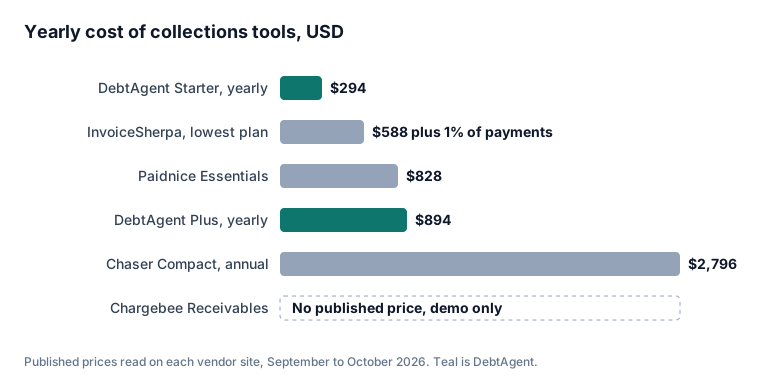
DebtAgent, Chaser, Paidnice and InvoiceSherpa publish prices you can use as initial budget benchmarks. Chargebee Receivables, Upflow and Tesorio do not. Published fees still need a scope comparison, especially around invoice payments, accounting connections and billing functions. The table includes quote-based options to make that pricing gap explicit.
| Tool | Published price | Billing basis | Best for |
|---|---|---|---|
| Chargebee Receivables | No published price | Not published; bundling unconfirmed | Collections tied to Chargebee billing records |
| DebtAgent | Starter $49, Plus $149, Pro $499, Enterprise $898 a month | Per organization; monthly or yearly | Collecting your own overdue B2B invoices |
| Chaser | Compact $259 a month ($233 billed annually), Core $779, Complete $1,169 | Monthly plan prices; Compact annual option shown | Buyers comparing published plan budgets |
| Paidnice | Essentials $69 a month; Pro from $99 | Monthly plan prices; Pro has a starting price | Buyers budgeting from a $69 starting plan |
| InvoiceSherpa | $49, $99 or $199 a month plus 1% on invoices paid through it | Monthly fee plus invoice payment percentage | Buyers comparing subscription and payment costs together |
| Upflow | No published price | Request pricing | Buyers prepared to obtain a quote |
| Tesorio | No published price; Vendr median contract $17,644 a year | Request pricing; median is buyer data | Buyers benchmarking a quote against contract data |
The Tesorio median is not a list price or a Chargebee estimate. Read the Tesorio pricing breakdown for context. Our Chaser alternative comparison and Upflow alternative comparison provide additional comparisons, while the guide to collections software for SaaS companies helps connect your shortlist to the work your team needs done.
Compare the same receivables population across your shortlist. A price for chasing invoiced contracts should be assessed against those contracts, while failed card renewals belong in the Billing comparison. Ask each vendor to confirm what its published fee covers before treating a lower starting price as a complete replacement.
When Chargebee Receivables is the better buy
Chargebee Receivables is the stronger fit when collections decisions need the same billing record as invoicing and revenue recognition, with subscription context beside each overdue account. Its risk scoring, collector ownership and action controls matter when those are requirements. Whether it is the better buy financially depends on the unpublished quote.
For an existing Chargebee customer, demonstrate the complete workflow using your subscription states and invoice disputes. Check how a collector approves a drafted resolution, where a promise to pay appears and which actions can run autonomously. Ask Chargebee to show your required accounting connection rather than treating an integration name as proof of fit.
Chargebee reports up to 20% more revenue collected and up to a 50% gain in collections efficiency. These are vendor claims without a published methodology, not forecasts for your portfolio. Judge the quote against the work demonstrated and the controls your finance team needs. DebtAgent does not provide risk scoring, billing or revenue recognition.
If you are comparing billing platforms as well as collections tools, keep the decisions connected. Chargebee offers billing context that a standalone collections tool does not supply. Ask whether your collectors need to see subscription state beside reminders or mainly need consistent contact on invoices already issued by your current system.
Where DebtAgent fits for SaaS invoices
DebtAgent fits US businesses collecting their own overdue B2B invoices when the main job is consistent follow-up. It sends escalating email sequences in your company's name and gives debtors a page to pay, promise a date or dispute. It does not handle billing, card retries or failed card payment dunning.
Starter costs $49 a month for 50 active debtors, Plus $149 for 250, Pro $499 for unlimited debtors and Enterprise $898. Plans are billed per organization and are month to month. Yearly billing costs half, with Starter at $294, Plus at $894 and Pro at $2,994 a year. See DebtAgent plans and pricing for the comparison.
CSV import is available on every plan. SMS and calls start on Plus through your own messaging account. QuickBooks Online and Xero sync are available only on Pro and Enterprise. Recovery reporting by aging bucket helps you review collections results. Choose a plan around the required debtor capacity, channels and accounting connection.
Once ACH and check payments arrive, bank reconciliation software can help with matching those payments to invoices because DebtAgent does not do cash application. If your main loss comes from failed card renewals, start with Billing dunning. If overdue invoiced subscriptions need follow-up, compare DebtAgent's published fee with the Receivables quote for that specific job.
Frequently asked questions
How much does Chargebee Receivables cost?
Chargebee Receivables has no published price as of October 2026. Its page offers a demo and Start free with early access open, but gives no ongoing fee. Published Chargebee Billing rates do not establish the Receivables cost. Request a written quote.
Does Chargebee Receivables work with QuickBooks?
Chargebee names QuickBooks among the accounting systems Receivables connects to. Confirm the required connection and data flow during a demo. DebtAgent offers QuickBooks Online sync on Pro and Enterprise only, with CSV import on every plan.
Is there a cheaper alternative to Chargebee Receivables?
DebtAgent starts at $49 a month, Paidnice at $69 and Chaser at $259. InvoiceSherpa starts at $49 a month plus 1% on invoices paid through it. These are published alternatives, but none can be proved cheaper than Chargebee Receivables until you have its quote. Their scope also differs.
Does Chargebee Billing include dunning?
Yes. Chargebee Billing lists basic dunning for online and offline payments and smart dunning. Failed card renewals belong to billing dunning. Following up on overdue annual or net 30 or net 60 B2B invoices paid by ACH or check is a collections problem.
- More on invoicesherpa pricing: InvoiceSherpa charges $49 to $199 a month plus 1% of paid invoices. Here is what that costs over a year, when the fee is waived, and the published prices of the alternatives.
- More on collections software for accountants: What an accounting or bookkeeping firm needs from collections software when it manages receivables for clients: per-organization pricing, sending in the client's name, the state licensing rule most guides miss, and what the Intuit Accountant Suite migration changes.
- Related page: Rocket Receivables alternative
- Related page: Accounts Receivable Outsourcing